Website Development Process: From Idea to Launch
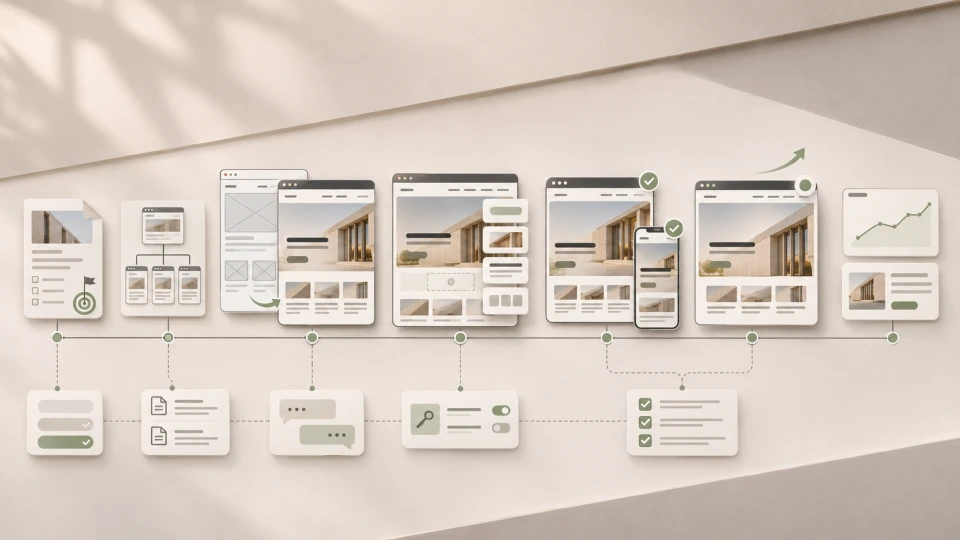
A professional website development process up to launch usually consists of six main stages: defining goals and requirements, planning structure and content, UX/UI design, technical development, testing and launch. This is followed by a seventh stage - monitoring and development after launch.
In simple terms:
idea → requirements → structure → design → development → testing → launch → growth
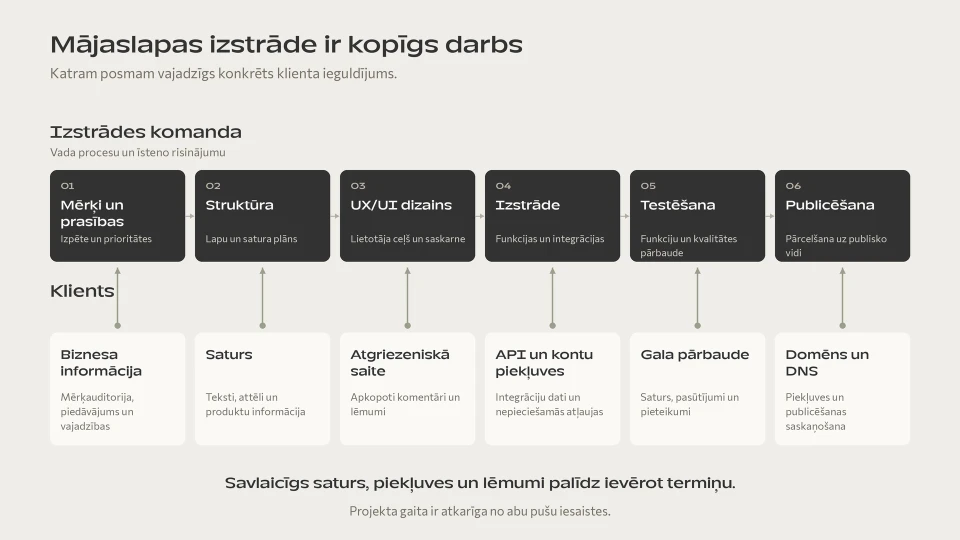
In reality, though, these stages are not just the developer's internal process.
Each of them also needs decisions, content, access or feedback from the client.
That is exactly why a website's timeline is most often determined not just by the amount of programming, but also by:
- how clear the initial brief is;
- whether the content is ready;
- how quickly decisions are made;
- whether the project includes integrations;
- how many people are involved in approvals;
- whether the original scope changes during the project.
This article is not about what website creation is in general. If you first need to understand the logic of building a website, the platforms and the key decisions, see our website creation guide.
Here we focus on one question:
what actually happens from the first idea to the moment the new website goes live?
~ 12min
18/11/2026
The website development process at a glance
| Stage | Stage deliverable | What is needed from the client |
|---|---|---|
| 1. Research and goals | A clear project brief and requirements | Business goals, audience, current situation |
| 2. Structure and content | Sitemap and content plan | Services, priorities, materials |
| 3. UX/UI design | Approved prototype and design | Feedback and a final decision |
| 4. Development | A working test version | Access, accounts, API and integration information |
| 5. Testing | A website ready for launch | Final content and a business review |
| 6. Launch | The website is live | Domain/DNS and other system access |
| 7. After launch | Improvements based on real data | Analytics and business priorities |
The process is not entirely linear.
Content is often prepared in parallel with design, development can start with already approved components, and testing happens throughout development.
This sequence helps you understand when which decisions need to be made and what is needed so the project doesn't stall.
1. Research and defining the project goal
A good website project doesn't start with the question:
"What design would you like?"
First, you need to find out:
what does the website need to do for the business?
For example:
- attract new B2B customers;
- generate enquiries;
- present the company in an international market;
- reduce manual customer service;
- sell products;
- connect enquiries to a CRM;
- replace an outdated website;
- build a foundation for SEO growth.
Two visually similar websites can have completely different business tasks.
What does the development team do?
Usually, they establish:
- business goals;
- target audiences;
- the main services or products;
- the most important user actions;
- competitors;
- problems with the existing website;
- languages;
- integrations;
- SEO requirements;
- technical constraints;
- future development plans.
If an existing website is being redesigned, available GA4, Search Console and user behaviour data are also analysed.
What does the client get?
A clear project direction and a set of requirements on which the structure, design and technical solution can be based.
What is needed from the client?
The client doesn't need to prepare a 50-page technical specification.
It's far more important to clearly explain:
- how the company makes money;
- who the main customers are;
- how sales currently work;
- what isn't working on the current website;
- what result the company wants to achieve.
A good project start is not:
"We need a WordPress website."
A better start is:
"We need a website that helps us get more high-quality B2B enquiries in the German market."
The technology can be chosen afterwards.
2. Website structure and content
Once the goal is clear, you need to plan what information the website needs and how it will be connected.
Usually, a sitemap is created.
For example:
Home page
→ Services
→ Service A
→ Service B
→ Projects
→ About us
→ Blog
→ Contact
In a professional project, the structure is not just a list of pages.
Each page's purpose needs to be clear.
A service page, for example, should help a person:
- understand the service;
- assess whether it suits them;
- see proof;
- understand the process;
- get to the enquiry.
SEO should be planned here, not at the end
If SEO is an important acquisition channel, keyword and search intent research should happen before design.
It affects:
- the service structure;
- URLs;
- the page hierarchy;
- internal links;
- language versions;
- content priorities.
If you only start planning the SEO structure after design, you may have to change an already approved information architecture.
What does the development team do?
They create:
- the sitemap;
- the information architecture;
- the goals of the main pages;
- the content structure;
- the initial SEO logic;
- wireframes, if needed.
What does the client get?
An approved website structure and a clear content plan.
What is needed from the client?
- existing copy and presentations;
- service information;
- product data;
- project examples;
- photos;
- brand materials;
- translation sources;
- a person responsible for approving content.
One of the most common reasons website projects are delayed is not programming, but unfinished content and late approvals.
That's why content shouldn't be left until the end of the project.
3. UX/UI design
Once the structure and main content are clear, UX/UI design begins.
UX defines:
- the order of information;
- user journeys;
- navigation;
- CTAs;
- form logic;
- the main scenarios.
UI defines:
- visual hierarchy;
- typography;
- colours;
- components;
- cards;
- buttons;
- responsive views.
Read more on this topic in our article UX/UI design that turns visitors into customers.
What does the development team do?
Depending on the project, they:
- create wireframes;
- define user flows;
- design the structure of the main pages or screens;
- build the UI system;
- prepare desktop and mobile views.
What does the client get?
An approved prototype and design system on which technical development can begin.
What is needed from the client?
Specific feedback and a final decision.
It's important to assess not only:
"Do I like it?"
but also:
- whether the offer is clear;
- whether the CTA is clear;
- whether important information is missing;
- whether the user journey matches the sales process;
- whether the design fits the brand.
4. Technical development
Once the design is approved, it is turned into a working website.
Depending on the project, this can include:
- frontend development;
- a CMS;
- WordPress;
- a custom backend;
- the responsive version;
- forms;
- multilingual functionality;
- CRM integration;
- APIs;
- analytics;
- cookie consent;
- a technical SEO foundation;
- migrations.
At this stage, the visual prototype becomes a real system.
For example, the design may include a form with five fields.
But technically, you need to know:
- where the data goes;
- whether it needs to be sent to the CRM;
- whether the customer should get an automatic email;
- whether a lead needs to be created;
- whether consent is required;
- what happens if the CRM is unavailable.
Visually, it's just a form.
Technically, it can be a whole data flow.
What does the development team do?
They build:
- the frontend and CMS;
- the necessary backend functionality;
- forms;
- integrations;
- responsive views;
- the analytics and technical SEO foundation.
What does the client get?
A working test version that can be checked with real content and integrations.
What is needed from the client?
Depending on the project:
- CRM/API documentation;
- accounts and access;
- domain information;
- analytics accounts;
- the email system;
- payment or other external service accounts.
If third-party access is only provided at the end of the project, testing the integrations can delay the launch.
5. Content upload and testing
Testing doesn't only happen the day before launch.
It happens throughout development, but a full final check with real content is needed before launch.
The following are checked:
- desktop and mobile;
- browsers;
- forms;
- links;
- CTAs;
- menus;
- integrations;
- language versions;
- 404 pages;
- metadata;
- images;
- performance;
- analytics events;
- cookie consent.
If an existing website is being replaced, these are also checked:
- the old and new URL map;
- 301 redirects;
- canonicals;
- the XML sitemap;
- the most important organic landing pages.
What does the development team do?
They carry out technical QA and check functionality, responsiveness, integrations and technical SEO.
What does the client get?
A version of the website ready for launch.
What is needed from the client?
A final review by the client.
The developer can check whether the form works.
The client knows:
- whether the service information is correct;
- whether the prices are up to date;
- whether projects are named correctly;
- whether the contact details are correct;
- whether the form asks for the right business information.
These are two different levels of review.
6. Launching the website
Once content, design, functionality and checks are complete, the website can go live.
Launch can include:
- preparing the production server;
- domain or DNS changes;
- SSL;
- the final database migration;
- redirects;
- activating analytics;
- Search Console;
- submitting the sitemap;
- cache/CDN configuration;
- a final check in the live environment.
What does the development team do?
They carry out the technical launch and check that the system works correctly in the live environment.
What does the client get?
A publicly available website.
What is needed from the client?
Mainly:
- domain access;
- DNS access;
- the necessary production accounts;
- final approval.
In practice, one of the most mundane but very real launch risks is:
nobody knows who has access to the domain account.
That's why it's better to find this out at the start of the project, not on launch day.
7. What happens after launch?
Launch is not the end of the project.
After launch, you can see for the first time how real users use the website.
You need to check:
- whether forms are arriving;
- whether analytics is collecting data;
- whether redirects work;
- whether there are 404 errors;
- whether Google can index the pages;
- whether there are problems that only occur in production.
After that, the website can be developed further with:
- new landing pages;
- SEO content;
- CRO improvements;
- integrations;
- new languages;
- new functionality.
A properly built technical foundation lets you roll out these changes gradually, instead of starting from scratch a year later.
How long does website development take?
A typical company website can be developed in roughly 4-8 weeks, but that is not a universal timeline.
The timeline is affected by:
- project scope;
- content readiness;
- integrations;
- number of languages;
- speed of approvals;
- changes during the project.
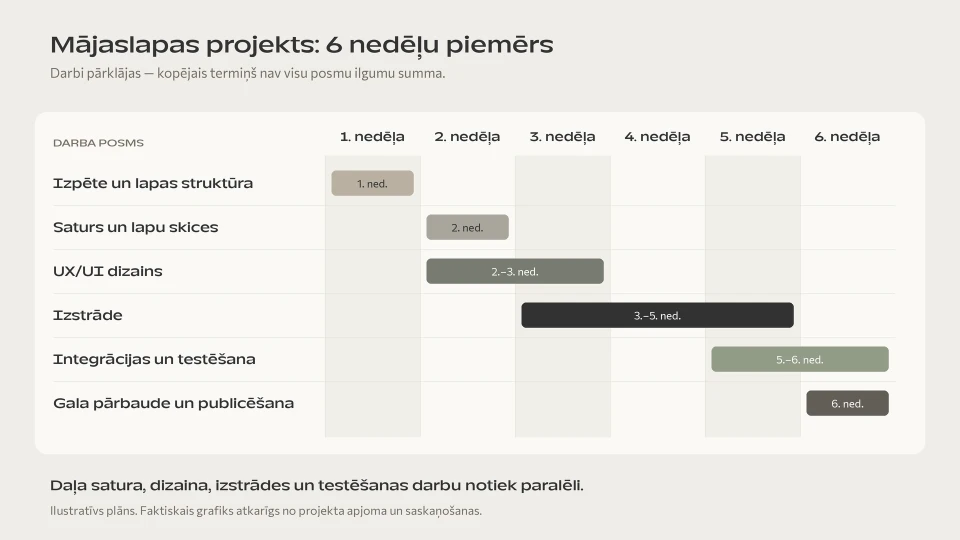
You shouldn't simply add up the durations of individual stages, because content, design, development and testing often happen partly in parallel.
For example, a realistic six-week project could look like this:
| Week | What happens |
|---|---|
| 1 | Research, business goals and sitemap |
| 2 | Content and wireframes |
| 2-3 | UX/UI design |
| 3-5 | Development and content upload |
| 5-6 | Integrations and QA |
| 6 | Final check and launch |
This doesn't mean every project will fit into exactly six weeks.
A project with:
- several languages;
- a large amount of content;
- CRM/ERP integrations;
- custom features;
- a complex migration
can take significantly longer.
We explain how project scope affects the budget in our article on how much website development costs.
What most often delays website development?
Often, it's not the code.
1. The content isn't ready
The design is ready, but copy, images or projects are missing.
2. There is no single decision-maker
Several people give conflicting feedback.
3. The project scope changes
After the design is approved, someone decides to add:
- a customer portal;
- a new language;
- bookings;
- a CRM integration.
This can change the structure, the design and the development scope.
4. Third-party access isn't ready
Missing:
- domain;
- CRM API;
- analytics account;
- email system;
- other external service accounts.
5. Feedback comes too late
It's better to approve each project stage than to review the whole website for the first time after six weeks.
What should the client prepare before the project starts?
A finished technical specification is not required.
But the process will be much faster if the following are available:
- the company's goal;
- the main services;
- target audiences;
- competitors;
- brand materials;
- existing copy;
- photos;
- analytics access;
- access to the existing website;
- integration requirements;
- one person responsible for decisions.
And most importantly:
a clear business goal.
The more precisely you understand what the new website needs to achieve, the easier it is to make all the other decisions.
How does Brandsite structure a website project?
In practice, Brandsite combines these stages into four larger project blocks:
strategy
→ structure and UX/UI
→ development and integrations
→ testing and launch
This makes it clear what is accepted and approved at each stage of the project.
Read more about the service itself on our website development page.
Frequently asked questions
Where does website development start?
With defining the business goal, the audience and the project requirements.
Design and technology are the next decisions.
How long does website development take?
For a typical company project, about 4-8 weeks, but the timeline depends on the project scope, content, integrations and the speed of approvals.
Does content need to be ready before design?
Not necessarily all of it.
But before design, the page structure and the approximate amount of content should be clear.
Final content can be prepared in parallel.
When is the website technology chosen?
Once the business and technical requirements are clear.
A platform shouldn't be chosen just because the company decided at the outset that "we want WordPress" or another specific technology.
When does testing start?
Testing happens throughout development.
Before launch, a full final check is carried out with real content and integrations.
Does the project end once the website is live?
No.
After launch, you need to monitor analytics, SEO, form performance and user behaviour, and the website can be developed further based on real data.
Summary
A professional website development process is not:
design → programming → launch
A fuller process is:
business goal
→ requirements
→ structure and content
→ UX/UI
→ development
→ integrations
→ testing
→ launch
→ growth based on real data
And every stage needs not only the development team, but also the client's involvement.
A website development timeline isn't determined by programming alone. It's determined by the whole flow of decisions, content, feedback, design, development and access.
Latest articles

From Expert Knowledge to a Digital Product Platform: The HICE Group Case
UX/UI Design That Turns Visitors into Customers
7 E-commerce Automations That Help Win Back Customers and Increase Sales