7 E-commerce Automations That Help Win Back Customers and Increase Sales
Many online stores focus on one question:
how do we get more people to the website?
They invest in Google Ads, Meta ads, SEO and social media.
But some sales opportunities are lost after a person has already reached the store.
They:
- view a product and leave;
- add an item to the cart but don't buy;
- start checkout and don't finish it;
- want a product that is out of stock;
- buy once and never come back.
This is exactly where e-commerce automation helps.
Abandoned cart emails, exit popups, back-in-stock notifications and other automated scenarios don't replace traffic acquisition. They help recover interest you have already earned and get more results from your existing visitors and customers.
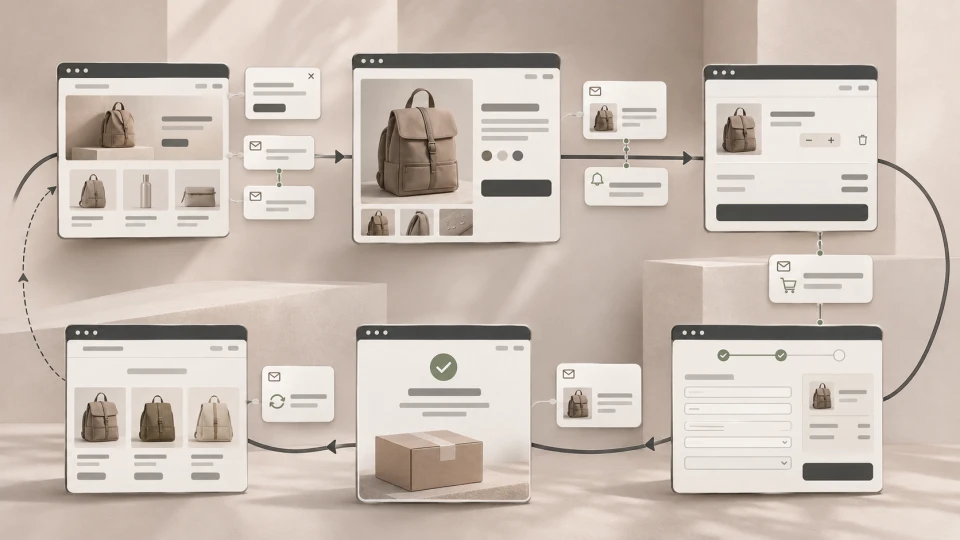
In simple terms, the customer journey can look like this:
visit → product view → cart → checkout → purchase → repeat purchase
A different automation can be used at each stage.
~ 11min
13/11/2026
1. Abandoned cart and checkout emails
One of the most valuable e-commerce automation scenarios is a reminder about an unfinished purchase.
The process can look like this:
customer adds an item to the cart → starts checkout → leaves → receives a reminder → returns to the purchase
The reminder can include:
- the products left in the cart;
- a product image;
- the price;
- a link back to checkout;
- delivery information;
- an answer to the most common hesitation.
It is important to separate two stages.
Abandoned cart
The person has added an item to the cart but has not yet started checkout.
Abandoned checkout
The person has already started checking out but has not finished.
A user at checkout is usually closer to buying, so the communication can be more specific too.
There is no need to give everyone a discount straight away.
The first reminder can simply help them continue the purchase.
If every unfinished purchase automatically gets a 10% discount, some customers may learn to wait for the code.
The more important question is:
why didn't the person complete the purchase?
The reason may be:
- an unexpected delivery cost;
- a missing payment method;
- a technical problem;
- wanting to compare prices;
- unclear return terms;
- simply an interrupted shopping session.
That is why abandoned cart automation should not compensate for a poor checkout. It should be looked at together with conversion rate optimisation.
2. Browse abandonment - a reminder about a viewed product
An abandoned cart is not the only signal of interest.
A person may view the same product several times but never add it to the cart.
This is where browse abandonment automation comes in.
For example:
product viewed → user leaves → later receives a reminder about the product
The message can show:
- the viewed product;
- similar models;
- the product's key benefits;
- reviews;
- a link to return.
But a product view is a weaker buying signal than a cart or checkout.
That is why the communication should also be gentler.
A good principle:
the closer the user was to buying, the more specific the automated reminder can be.
3. Exit popup
A popup by itself doesn't guarantee sales.
What matters is when it is shown.
On desktop, an exit-intent popup can be triggered when the user's behaviour suggests they are about to leave the page.
For example:
Before you go - would you like to get our offers by email?
or:
Didn't find what you were looking for? Get our product buying guide.
This is often less disruptive than a popup that covers the screen a few seconds after the page opens.
An exit popup can be used for:
- collecting email addresses;
- a first-purchase offer;
- a free delivery offer;
- a product guide;
- another specific benefit.
You don't need to show the same popup to everyone automatically.
For example, there is no point offering this again to someone who is already on your email list:
"Sign up for our newsletter!"
A popup can be tailored by:
- page;
- user status;
- device;
- cart contents;
- visit duration;
- scroll depth;
- other behavioural signals.
On mobile, exit intent is usually detected differently from desktop, so you shouldn't simply carry over the same trigger logic.
On mobile, the popup also needs to be easy to close and must not get in the way of viewing the product.
4. Welcome email automation
If someone has agreed to receive communication and left their email address, there is no need to wait until the next general newsletter campaign.
You can use an automated welcome sequence.
For example:
Email 1
The promised benefit - a discount code, a guide or another offer.
Email 2
The most relevant products or categories.
Email 3
Reviews, FAQs or the brand's advantages.
It's even better if the communication is tailored to where the person signed up.
If the email was collected in the running shoes category, the next messages could be about:
- running shoes;
- the most popular models;
- choosing the right size;
- related products.
Then the automation is not just an "automatic email" but a continuation of a specific interest.
5. Back-in-stock notifications
A customer finds the right product, but the size or colour they need is out of stock.
One option:
Not available.
And the customer journey ends there.
A better option:
Notify me when the item is back in stock.
The customer leaves their contact details, and when the specific product or variant is back in stock, the system sends a notification.
This is especially valuable for stores that often sell out of:
- sizes;
- colours;
- seasonal products;
- limited-quantity items;
- popular models.
The interest here is very specific.
The person hasn't just said:
"Send me news."
They have said:
"I want to know when this exact product can be bought."
That is a strong signal of buying interest.
6. Post-purchase automation
The customer journey doesn't end with the first order.
After the purchase, the next cycle can begin:
purchase → use → review → add-on product → repeat purchase
Depending on the product, you can automate:
- usage instructions;
- care tips;
- review requests;
- cross-sell offers;
- add-on product recommendations;
- repeat purchase reminders.
For example, after buying a coffee machine, the following may become relevant later:
- filters;
- cleaning products;
- coffee;
- maintenance information.
This is far more logical than sending a random discount on anything else in the store right after the purchase.
The value of automation is that the next message follows from the customer's previous action.
7. Win-back and repeat purchase automation
Some customers buy once and never come back.
If a product's buying cycle is predictable, you can use repeat purchase reminders.
For example:
purchase → typical consumption period → no new order → reminder
This is especially useful for products that are regularly:
- consumed;
- topped up;
- replaced.
Win-back campaigns, on the other hand, can be used for past customers who haven't returned for a longer time.
But the timing should match the actual buying cycle.
If someone typically buys a product every six months, sending this after 30 days:
"We miss you!"
doesn't make much sense.
Automation should be based on the customer's real behaviour.
A note on email consent
Just because a system technically knows a person's email address does not automatically mean you can send them any marketing automation.
Before setting up welcome, browse abandonment, abandoned cart, win-back and other commercial emails, you need to check whether there is an appropriate legal basis for that specific communication and that the user has a clear way to opt out.
In Latvia, as elsewhere in the EU, sending electronic commercial communications to individuals generally requires their prior, freely given and unambiguous consent.
There are also conditions under which a company can use an email address obtained during a sale to communicate about its own similar products or services, provided the person did not object initially and can opt out free of charge in every subsequent message.
The specific scenario should be assessed before the automation is set up.
Which automations should you start with?
There is no need to build 20 automations straight away.
For a typical online store, the starting priority could look like this, but it should be adapted to your products and your customers' buying cycle.
| Priority | Automation | Why |
|---|---|---|
| 1 | Abandoned checkout / cart | The user is already close to buying |
| 2 | Welcome automation | Helps you engage a newly acquired audience |
| 3 | Back in stock | Based on interest in a specific product |
| 4 | Post-purchase | Helps build repeat purchases |
| 5 | Exit popup | Can turn an anonymous visitor into a contact |
| 6 | Browse abandonment | Brings back users with product interest |
| 7 | Win-back | Reactivates past customers |
But this is not a universal top-7 order.
If products almost never sell out, a back-in-stock feature will matter less.
If products are consumed regularly and bought again, repeat purchase automation may be one of the first priorities.
Automation won't fix a poor online store
An important boundary:
automation cannot fix a fundamentally poor buying process.
If people abandon checkout because:
- delivery is too expensive;
- the payment method they need is missing;
- mobile checkout doesn't work;
- product information is unclear;
- the store doesn't inspire trust,
three more abandoned cart emails won't solve the problem.
First, you need to find out why people drop out of the process.
Only then can automation help bring back some of the users who still have buying interest.
What to measure?
Don't just look at:
how many emails did we send?
It's more important to assess:
- recovered orders;
- revenue generated by automation;
- number of purchases;
- repeat purchases;
- back-in-stock conversions;
- revenue per recipient;
- unsubscribe rates.
Then you can see whether the automation really helps the business or just creates more messages in the customer's inbox.
How should it all be connected?
In a good system, these automations are not seven independent plugins that know nothing about each other.
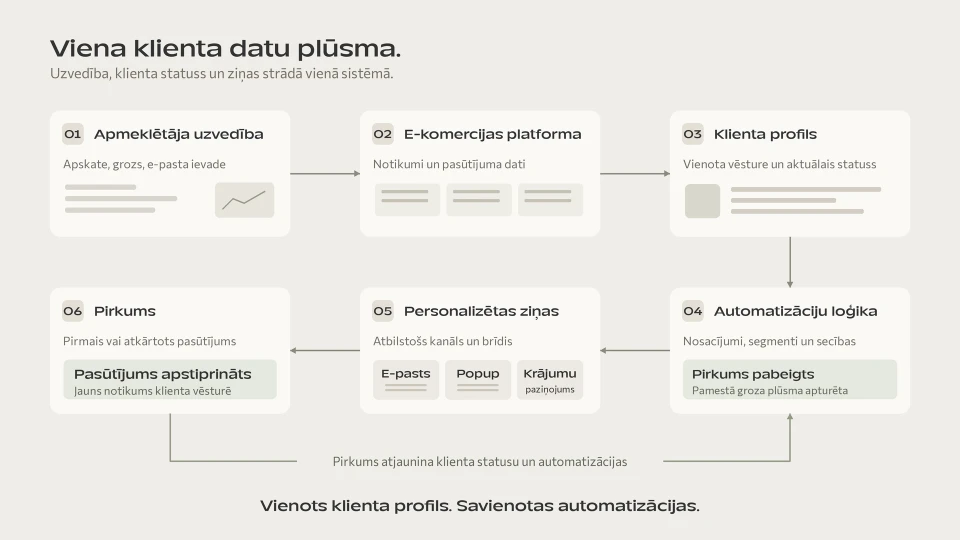
The process looks more like this:
visitor → behavioural data → e-commerce platform → customer profile → automation → personalised communication → purchase
For example:
the customer views a product
→ adds it to the cart
→ starts checkout
→ buys.
If the purchase has already been made, the abandoned cart reminder should no longer be sent.
That is exactly why, in online store development, what matters is not only each feature, but also the data flow between systems.
We explain how to connect an online store to ERP, CRM, warehouse and delivery systems in our article on online store automation and integrations.
Read more about payments, integrations and e-commerce architecture in our online store development guide.
Frequently asked questions
What is abandoned cart automation?
It is automatic communication with a user who has added a product to the cart or started checkout but has not completed the purchase.
There must be an appropriate legal basis for sending that communication.
Does an abandoned cart email have to include a discount?
No.
The first reminder can simply help the customer continue the purchase.
Discounts should be used deliberately, not automatically for every unfinished purchase.
What is an exit popup?
An exit popup is a message or form shown when the user's behaviour suggests they may be about to leave the page.
The signals that trigger it can differ between desktop and mobile.
What is browse abandonment?
Browse abandonment is an automation scenario for a user who has viewed a product but not added it to the cart or bought it.
It is a weaker buying signal than an abandoned checkout.
Does a small online store need email automation?
A complex system is not always needed.
But even a small store can benefit from automating a few specific scenarios, such as abandoned checkout, welcome emails or back-in-stock notifications.
Summary
More sales don't always start with more traffic.
What happens after a person has already reached the store matters too.
Automations can help continue the customer journey:
exit popup → welcome
product view → browse abandonment
cart / checkout → reminder
out of stock → back in stock
purchase → post-purchase
hasn't bought in a while → win-back
These tools don't replace a good e-commerce platform, UX or traffic acquisition.
They help you lose less of the interest you've already earned and work more systematically with your existing visitors and customers.
Latest articles
What Is WooCommerce in E-commerce Development?
E-commerce SEO: A Practical Guide
What Is Conversion Rate Optimisation (CRO)?