AI Agents Can't Read JavaScript: How to Check If Your Website Is Visible to AI Search

Important: not all AI agents behave the same way. Googlebot and browser-based agents can render JavaScript, while several major AI crawlers were observed not executing client-side JavaScript in Vercel/MERJ's December 2024 study.
That is why the headline of this article is deliberately sharp, while the question itself is more nuanced.
The right question is not:
"Does AI read JavaScript?"
but:
"Is our most important content also available to a system that receives only the initial HTML and does not execute JavaScript?"
This is exactly the question that came up in our own Brandsite SEO audit.
On 25 October 2026, we carried out an SEO audit of the Brandsite website using Ahrefs Site Audit and additional manual analysis.
One of the areas the audit prompted us to examine in depth was content accessibility and the role of JavaScript from the perspective of different bots.
We started comparing:
what a person sees in the browser
versus
what the server sends in the initial HTML before JavaScript is executed.
This was not a conclusion that "AI can't see Brandsite" or that JavaScript is a problem in itself.
It raised a far more valuable technical question:
is the essential information we want to be findable in Google and AI search also available when a particular bot does not render the page like a full browser?
In this article, we show how to check this risk yourself, how to interpret the result and what to do if important content only becomes available after JavaScript is executed.
~ 20min
07/11/2026
Why has this question become important in the age of AI search?
In traditional SEO, the main technical question for a long time was:
"Can Googlebot crawl, render and index this page?"
Google has been processing JavaScript for years.
But the AI search environment is not a single bot or a single technology.
Today, a company's content may be accessed by:
- Googlebot;
- AI search crawlers;
- model training crawlers;
- user-initiated fetchers;
- browser agents;
- other automated bots.
They may use different infrastructure and may have different purposes.
Therefore:
"AI bot" is not a single technical category.
An AI crawler and an AI agent are not the same thing
This is one of the most important distinctions in the whole topic.
AI crawler
A crawler mainly:
- requests a URL;
- receives the server response;
- reads the content;
- follows links;
- collects information for an index, a search feature, a dataset or another purpose.
It does not necessarily have to behave like a person's Chrome browser.
Browser-based AI agent
A browser agent, on the other hand, can behave much more like a human:
- open the page in a browser;
- execute JavaScript;
- analyse the DOM;
- use the accessibility tree;
- view the rendered page;
- click;
- scroll;
- fill in forms;
- perform other actions.
That is why the headline "AI agents can't read JavaScript" is not a universal technical law.
It describes a real problem:
you cannot assume that every system you want to be visible to will execute your client-side JavaScript the same way a human's browser or Googlebot does.
There is no single "ChatGPT bot" either
OpenAI publicly distinguishes between several types of web access.
OAI-SearchBot
OAI-SearchBot is linked to ChatGPT Search and is used so that websites can appear in ChatGPT search results.
GPTBot
GPTBot is linked to collecting content that may be used to improve OpenAI's generative models.
ChatGPT-User
ChatGPT-User may visit a page during a specific user-initiated action.
This is not the same as an automatic web crawler.
That is why OAI-SearchBot and GPTBot can also be controlled separately in robots.txt.
For example, a company may want to be available in ChatGPT Search but not allow the model training crawler to use its website.
It may look like this:
User-agent: OAI-SearchBot
Allow: /
User-agent: GPTBot
Disallow: /
Important:
You do not need to allow GPTBot just so your website can appear in ChatGPT Search.
What do public tests show about AI crawlers and JavaScript?
The date matters here.
In the analysis published by Vercel and MERJ on 17 December 2024, several major AI crawlers did not execute JavaScript.
During the tested period, this applied to:
- OpenAI OAI-SearchBot;
- GPTBot;
- ChatGPT-User;
- Anthropic ClaudeBot;
- Meta-ExternalAgent;
- ByteDance Bytespider;
- PerplexityBot.
Google's infrastructure, by contrast, did render JavaScript.
Vercel/MERJ also observed an interesting nuance: some crawlers requested JavaScript files, but that did not mean they executed the code and produced the same page state as a browser.
These results described crawler behaviour during that specific 2024 testing period.
AI platform infrastructure changes, so they should not be read as a guarantee that every service behaves identically in November 2026.
Even so, Vercel still refers to this observation in more recent materials, warning in particular about products and other information that is loaded only after client-side JavaScript runs.
That is why the safest technical principle remains simple:
your most important public content should not be available only after client-side JavaScript is executed.
What is the initial HTML?
When a person opens a website, the browser first receives the server response.
The HTML document may already contain:
- the H1;
- text;
- links;
- navigation;
- product information;
- prices;
- metadata.
After that, the browser may execute JavaScript that:
- adds extra content;
- loads data from an API;
- changes page elements;
- activates interactive features;
- builds client-side components.
The risk arises when the initial HTML contains only a minimal application shell, for example:
<div id="app"></div>
while the essential content is created only after JavaScript runs.
A person sees a complete page in the browser.
A crawler that does not execute JavaScript may receive much less information.
A simple test you can run yourself in a few minutes
This is not a complete AI visibility check, but it is a very good first diagnostic.
1. Choose an important page
For example:
- a service page;
- a product page;
- a category;
- an important blog article;
- the "About us" page.
Don't check only the homepage.
Choose pages whose information really needs to be findable.
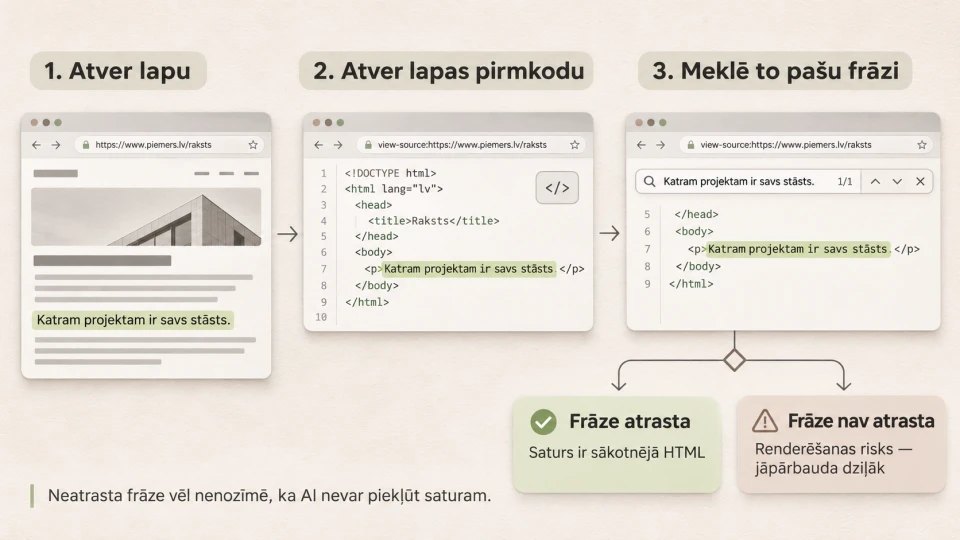
2. Find a unique sentence
Open the page in a normal browser and copy one important sentence from the main content.
For example:
"We develop custom web applications with user roles, data flows and API integrations."
Choose something specific, not navigation text.
3. Open View Source in a desktop browser
In Chrome and several other desktop browsers you can use:
view-source:https://yourdomain.com/page/
or choose:
View Page Source
View Source is not as universally available on mobile devices, so this check is easier to do on a computer.
4. Search for the same phrase
Use:
Ctrl + F
or on a Mac:
Cmd + F
and enter the chosen sentence.
5. Interpret the result
If the text is in the initial HTML:
that is a good starting signal. The essential content does not depend entirely on client-side JavaScript.
If the text is not in the initial HTML but is visible in the browser:
the content is probably added during rendering.
This does not mean:
"AI can't see this page."
It means:
"This content depends on rendering, and that should be checked in more depth."
It is a risk indicator, not a diagnosis.
Why isn't the View Source test perfect?
View Source only shows:
what the server sent in the initial HTML.
It does not show:
- what Google sees after rendering;
- whether a specific AI service uses a different index;
- whether a browser agent will render the page;
- whether the content has already been obtained from another source;
- whether the bot is allowed to access the page;
- whether the WAF or CDN lets the crawler through.
So this is the first test, not the full diagnosis.
Its big advantage is simplicity: a marketing manager or business owner can do it without any programming knowledge.
Second test: what happens without JavaScript?
The next question:
does the page still provide meaningful information if JavaScript doesn't run?
Not everything has to work without JavaScript.
For example, it is not critical if these don't work:
- animation;
- live chat;
- a complex filter;
- a calculator;
- a carousel;
- interactive features of a user dashboard.
But on an important public page, these should not disappear:
- the H1;
- the main service or product description;
- essential specifications;
- the key benefits;
- important internal links;
- information about the company's experience.
Interactivity can be JavaScript. The existence of information doesn't have to depend on JavaScript.
This is one of the most important principles in this entire article.
Third test: check robots.txt
Sometimes the problem has nothing to do with rendering.
The content may be perfectly available in the HTML, but the crawler is not allowed access.
Open:
https://yourdomain.com/robots.txt
and check the rules for different user agents.
With OpenAI, for example, OAI-SearchBot and GPTBot can be controlled separately.
If you want to appear in ChatGPT Search but don't want to allow the training crawler:
User-agent: OAI-SearchBot
Allow: /
User-agent: GPTBot
Disallow: /
It is important to remember:
robots.txt control and the ability to render JavaScript are two different questions.
A bot may be allowed but unable to execute JavaScript.
Or it may be able to render the page but be blocked at the access level.
Fourth test: is your hosting, CDN or WAF keeping crawlers out?
robots.txt is not the only blocking mechanism.
Access can be restricted by:
- Cloudflare;
- a WAF;
- a CDN;
- bot protection;
- rate limiting;
- a JavaScript challenge;
- CAPTCHA;
- IP blocking.
A human's browser may pass the security check successfully.
A crawler may receive:
403 Forbidden
or:
429 Too Many Requests
and never reach the content at all.
For Search visibility, OpenAI's documentation recommends not only allowing OAI-SearchBot in robots.txt, but also making sure your hosting and security infrastructure allows traffic from OpenAI's published SearchBot IP addresses.
So a technical AI visibility check should look not only at:
"Is the content in the HTML?"
but also:
"Can the crawler reach that HTML at all?"
Fifth test: server and CDN logs
Server or CDN logs let you see the actual activity of crawlers.
You can check whether requests include:
- Googlebot;
- OAI-SearchBot;
- GPTBot;
- ClaudeBot;
- PerplexityBot.
In the logs you can see:
- which URLs the bot requests;
- how often it comes;
- which HTTP status it receives;
- whether 403 errors occur;
- whether 429 errors occur;
- whether it regularly ends up on 404 pages.
But there is one important security nuance.
The user-agent name alone is not enough to reliably prove that a request was really made by a specific service.
User agents can be spoofed.
If more reliable verification is needed, for specific services you should also check:
- officially published IP ranges;
- the service's documented verification mechanism;
- other official bot identification information.
OpenAI, for example, publishes separate IP lists for OAI-SearchBot, GPTBot and ChatGPT-User.
Why "I asked ChatGPT and it didn't mention us" is not a technical test
This is one of the most common mistakes in AI SEO.
A company asks:
"What are the best web development companies in Latvia?"
ChatGPT doesn't mention the company.
The conclusion:
"ChatGPT can't see our website."
That is not a technically sound conclusion.
The answer can be influenced by:
- how the question is phrased;
- the model;
- the platform;
- whether the Search feature is used;
- the index used;
- the available sources;
- competitor information;
- natural variation in the answer itself.
Not being mentioned does not prove a JavaScript problem.
First, we check the technical side:
access → server HTML → rendering → robots → status codes → indexing
and only then evaluate actual AI visibility.
Google is an important exception
Googlebot renders JavaScript.
In simplified terms, Google's JavaScript processing can be described as:
crawling → rendering → indexing
Google uses Chromium to render JavaScript pages.
Google's generative search features are not a completely separate "AI crawler SEO universe" either.
AI Mode and AI Overviews use Google Search infrastructure, its index and its quality systems.
That is why, for visibility in Google AI, it still matters:
- that the page can be crawled;
- that it can be indexed;
- that resources are not blocked;
- that important content is available;
- that the site's technical SEO is in order.
This does not mean Google will always handle every JavaScript implementation perfectly.
But the presence of JavaScript is not, in itself, a Google SEO problem.
Why is server-side HTML a safe foundation?
The goal is not:
"don't use JavaScript".
JavaScript is a normal part of modern web development.
The goal is:
"don't make essential public information unnecessarily dependent on client-side rendering."
If the server already sends:
- the page title;
- the main text;
- links;
- product data;
- service information;
then JavaScript can add on top:
- interactivity;
- filters;
- calculators;
- animations;
- user state;
- other dynamic elements.
This is a far more resilient model in an environment of many different crawlers and agents.
Business requirement first, then SSR, SSG or ISR
There is no need to start with the name of a technology.
What matters is making sure that:
publicly important content is already available in the server response as readable HTML.
Only then do you choose the technical approach.
Server-side rendering (SSR)
The server generates HTML at request time.
The crawler receives the content in the document straight away.
Static Site Generation (SSG)
HTML is prepared in advance, for example at build time.
This works well for content that doesn't need to change every second.
Incremental Static Regeneration (ISR)
A statically generated page can be refreshed periodically without rebuilding the entire site.
Prerendering
The system prepares a rendered HTML version in advance.
The specific architecture is a development question.
The business question stays the same:
what does the crawler receive before client-side JavaScript has to be executed?
What about dynamic rendering?
A once-popular approach was dynamic rendering:
- users get a client-side JavaScript page;
- bots get a separately generated rendered version.
Google now considers this approach a workaround rather than a recommended long-term solution.
In practice, a better foundation is:
- server-side rendering;
- static rendering;
- hydration;
- another architecture where essential content is available to both the user and the crawler.
This also reduces situations where you have to maintain two technically different versions of the same page.
Should you create a special HTML version for AI bots?
Usually not.
It is not a good idea to show one piece of content to people and substantially different content to bots just to manipulate visibility.
A better principle is:
one high-quality version of the information, technically accessible to as wide a range of systems as possible.
This helps:
- people;
- Google;
- AI crawlers;
- accessibility tools;
- other automated clients.
Which websites have a higher JavaScript/rendering risk?
| Situation | Content accessibility risk for a crawler without JavaScript |
|---|---|
| Traditional server-rendered website | Lower |
| WordPress content already in the server HTML | Usually lower |
| React, Vue, Nuxt or Next site built with SSR/SSG | Usually lower |
| SPA with almost empty initial HTML | Higher |
| Product data loads only after a client-side API request | Higher |
| H1 and main text are created only on the JavaScript side | Higher |
| JavaScript used mainly for interactivity | Lower |
| CDN/WAF blocks the crawler | High regardless of rendering |
This table does not show the overall chance of AI visibility.
It shows only the technical content accessibility risk for a crawler that does not execute JavaScript.
A server-side WordPress site can be technically perfectly accessible and still not be used in AI answers if its content isn't good or relevant enough.
What should be readable without full client-side rendering?
Priorities:
The main page heading
The H1 helps understand what the page is about.
The main informational content
A service definition, product description or key specifications should not disappear without JavaScript.
Important internal links
The crawler needs to be able to discover other important pages.
Canonical and robots directives
These must be implemented correctly.
Essential product or service data
If price, availability or specifications matter for understanding the content, assess how different clients receive that information.
This doesn't mean all real-time data must go into static HTML.
The important distinction is:
core information
versus
dynamic user functionality.
What did Brandsite's 25 October audit give us?
In this context, the most important result of our audit was not a specific Ahrefs number.
It was the question we started checking systematically:
what Brandsite content does a bot receive before JavaScript runs, and what content does a person see after full rendering?
It also changed how we think about the audit itself.
Not:
Ahrefs found a JavaScript problem → fix the JavaScript
but:
the tool flags a possible technical signal → we check the initial HTML → compare it with the rendered page → assess the possible impact → only then decide on changes.
The presence of JavaScript is not an error in itself.
The problem arises when the technical implementation creates an unnecessary barrier to information we want to be findable.
Our test: the Brandsite homepage
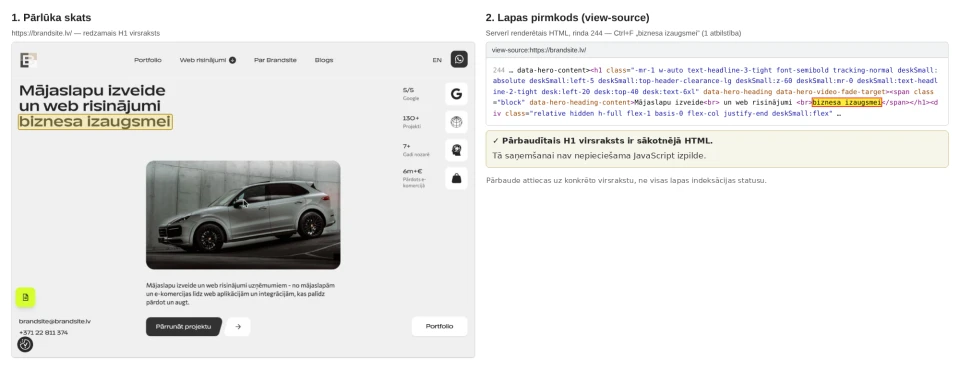
URL tested:
https://brandsite.lv/
Phrase tested:
the homepage H1 "Mājaslapu izveide un web risinājumi biznesa izaugsmei" ("Website development and web solutions for business growth"; we searched for "biznesa izaugsmei")
View Source result:
the phrase is in the initial HTML - it can be found in the server-rendered HTML (1 match).
Conclusion:
the homepage's main heading is already available in the server response, and no JavaScript execution is needed to receive it. This check applies to that specific heading, not to the indexing status of the whole page.
How does this relate to AI SEO?
AI SEO is not a special trick you can bolt onto a technically inaccessible website.
Visibility in AI search still requires:
technically accessible content → clear structure → useful information → trustworthy sources
That is why JavaScript rendering is a good example of where:
classic technical SEO
and
AI discoverability
overlap.
Does llms.txt solve the JavaScript problem?
No.
llms.txt does not automatically make client-side rendered content accessible to a crawler.
In its guidance on optimising for AI features, Google states that llms.txt is not required for Google Search generative features and does not, by itself, improve or worsen visibility in Google.
That doesn't mean other services can never use such files.
But it is not a substitute for technically accessible content.
If important text exists only after JavaScript runs, content accessibility has to be fixed first.
Will a special AI Schema.org markup solve the problem?
No again.
There is no special AI SEO or GEO Schema.org markup that is required for Google AI Mode or AI Overviews.
Regular structured data is still useful where it matches the specific content.
But it should not become a substitute for the content itself.
The right order is:
accessible content → correct HTML structure → appropriate structured data
not the other way round.
What to check in a technical AI visibility audit
If the goal is to understand whether a website is technically ready for the wider AI search environment, the check doesn't end with View Source.
1. Initial HTML
Does the important content exist in it?
2. Rendered page
What is added only after JavaScript runs?
3. Google crawling and indexing
Can Google crawl and index the page correctly?
4. AI crawler access
What does robots.txt allow?
5. CDN and WAF
Is the security infrastructure keeping crawlers out?
6. HTTP status codes
Does the bot receive:
- 200;
- 301;
- 403;
- 404;
- 429?
7. Internal links
Can important pages be discovered without complex JavaScript interaction?
8. Content structure
Is the essential information easy to find?
9. Actual AI visibility
Is the company, its pages and its information used or cited in the AI search environment?
This is where classic technical SEO moves into a broader AI discoverability assessment.
What to do if important content isn't in the initial HTML?
First of all, this doesn't automatically mean the whole website needs to be rebuilt.
A practical process:
1. Identify the most important pages
Don't start with every URL.
Start with:
- main service pages;
- product categories;
- product pages;
- the most important articles;
- company information.
2. Identify the critical content
What on this page must a crawler understand?
3. Evaluate server-side or static rendering
Sometimes it is enough to change a specific component or the way data is fetched.
4. Leave JavaScript for interactivity
JavaScript itself is not the problem.
5. Test again
After the changes, compare:
- View Source;
- the rendered page;
- crawler access;
- HTTP status codes;
- server logs.
The goal is not to build:
"a 100% static website".
The goal is:
to remove unnecessary technical barriers to important public information.
Frequently asked questions
Do AI agents really not read JavaScript?
Not all of them.
Googlebot renders JavaScript, and browser-based AI agents can use a full browser.
However, in Vercel/MERJ's December 2024 tests, several major AI crawlers did not execute JavaScript.
So the headline describes a real technical risk, not a universal law about all AI agents.
Does ChatGPT read JavaScript?
It isn't accurate to call all of OpenAI's web access methods a single "ChatGPT crawler".
OpenAI uses OAI-SearchBot, GPTBot and ChatGPT-User for different purposes.
In the 2024 Vercel/MERJ test, the OpenAI crawlers analysed did not execute JavaScript.
However, browser-based and user-initiated scenarios may work differently, and the infrastructure can change over time.
Can Google AI Overviews see JavaScript content?
Google's generative AI features are built on Google Search infrastructure, and Googlebot renders JavaScript.
The page still needs to be crawlable, indexable and technically well built.
Is JavaScript bad for SEO?
No.
JavaScript is a normal modern web technology.
The risk comes from a specific implementation, when important public content or links become available only after client-side rendering.
Is this less of a problem for WordPress sites?
Often yes, because WordPress core content is usually sent in the server HTML.
But WordPress can also use plugins, widgets or third-party solutions that load content only with JavaScript.
So you need to check the specific page rather than rely on the name of the CMS.
Can AI crawlers see a Nuxt or Next.js website?
It depends on the rendering configuration.
Nuxt and Next.js can use server-side rendering or static generation, where the crawler receives complete HTML.
But it is also possible to build pages where essential information is fetched only on the client side.
The framework name alone guarantees nothing.
Do I need to allow GPTBot to appear in ChatGPT Search?
No.
For ChatGPT Search, OpenAI uses OAI-SearchBot.
GPTBot is linked to collecting model training data, and the two can be controlled separately.
Does llms.txt help AI visibility?
It is not required for Google Search generative features.
It also doesn't solve client-side rendering, robots.txt, WAF or crawler access problems.
How can I quickly tell whether a website has a rendering risk?
In a desktop browser:
- choose an important page;
- copy a unique sentence from the content;
- open View Source;
- search for that sentence.
If it is visible in the browser but can't be found in the initial HTML, there is reason to run a more in-depth rendering check.
That is not yet proof that a specific AI service can't see the page.
Summary
The biggest mistake is assuming that what a person sees in the browser is automatically the same as what every search or AI bot receives.
Some systems render JavaScript.
Others have not done so in specific tests.
Browser agents can use a full browser.
Crawlers may work mainly with the server response.
That is why the sustainable principle is:
your most important public content should be technically accessible to as wide a range of systems as possible.
Brandsite's 25 October SEO audit prompted us to look into exactly this question in depth:
not just "does the page work in the browser?", but "what information do different systems receive from it?".
And that is exactly where a simple technical checklist ends and a modern SEO / AI discoverability audit begins.