What Is Technical SEO?

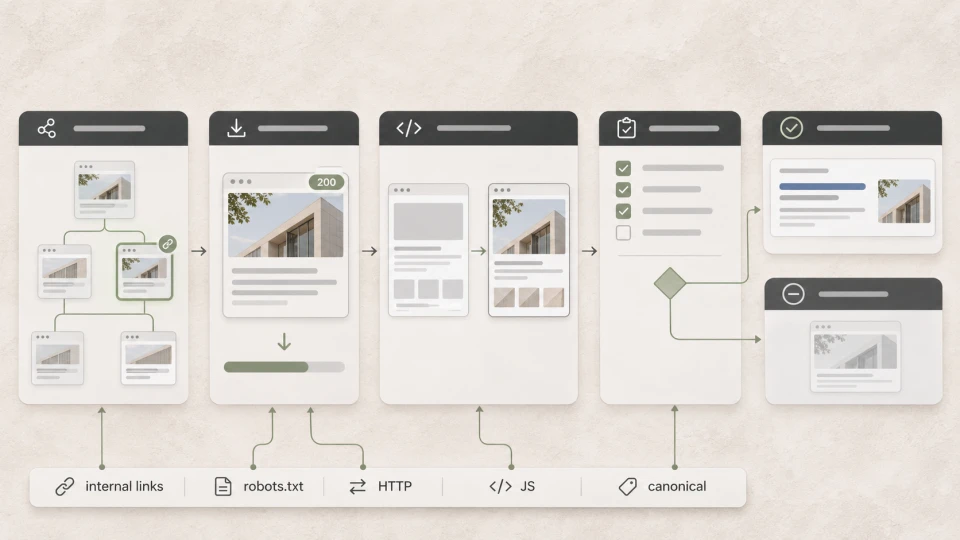
Technical SEO is the optimisation of a website's technical foundation so that search engines can find, crawl, render and index its pages.
Put simply: even excellent content cannot compete fully in Google's results if the search engine cannot access it properly or work out which version of the page is the main one.
Technical SEO includes, for example:
- crawlability;
- indexing;
- HTTP status codes and redirects;
- canonical tags;
- XML sitemap and robots.txt;
- site speed;
- internal linking and URL structure;
- accessibility of JavaScript content;
- structured data.
~ 8min
02/11/2026
How is technical SEO different from the rest of SEO?
In simple terms, SEO can be divided into three parts:
| Part of SEO | Key question |
|---|---|
| Technical SEO | Can the search engine access the website correctly and understand its technical structure? |
| On-page SEO and content | Does the page give a good answer to the specific search? |
| Off-page SEO | Does the website have enough authority and high-quality external signals? |
For example, a service page may have excellent content and well-chosen keywords.
But if a noindex tag has been added to the page by mistake, a technical issue can stop it from appearing in Google's results.
On the other hand, a technically perfect website does not guarantee good rankings on its own if its content is not useful enough or does not match what people are searching for.
What does technical SEO check?
The main technical SEO checks can be summarised as follows:
| Area of technical SEO | What is checked |
|---|---|
| Crawlability | Whether bots can find and open the important pages |
| Indexing | Whether Google indexes the correct versions of pages |
| URLs and redirects | Canonical tags, 301s, 404s and URL parameters |
| Performance | Speed and Core Web Vitals |
| Site structure | Internal links and URL architecture |
| Rendering | Whether key content and links are accessible on JavaScript websites |
| Structured data | Whether Schema.org markup is used correctly |
1. Can search engines crawl the website?
Before Google can index a page, it first has to be able to find and access it.
Technical SEO checks:
- robots.txt;
- internal links;
- XML sitemap;
- HTTP status codes;
- broken links;
- creation of unnecessary URLs;
- whether important pages have been blocked by mistake.
For a page to have a chance of getting into Google's index, Googlebot must be able to access it and the page must return a correct HTTP status.
It is also important to distinguish crawling from indexing:
the fact that Google can open a URL does not necessarily mean it will be indexed.
2. Are the important pages being indexed?
Indexing means that Google has processed the page's content and can use it in search results.
Problems can arise if:
- the page has a noindex tag;
- Google chooses a different canonical URL;
- there are several near-identical pages;
- important content is not accessible;
- the URL is redirected incorrectly;
- the page returns the wrong status code.
So the important question is not just:
"Does Google know this URL?"
but:
"Is Google indexing exactly the version of the page we want to see in search results?"
3. Are URLs, canonicals and redirects in order?
The same content can sometimes have several URLs, for example:
- an old and a new URL;
- URLs with parameters;
- filter pages;
- several very similar pages.
Canonical tags help indicate the preferred main version of a page, while 301 redirects are used when a URL has changed permanently.
This is especially important after a website rebuild, a change in URL structure or a migration.
Incorrect configuration can lead to Google indexing a different URL from the one the business intended.
4. Is the website fast and stable enough?
Technical SEO also covers website performance.
The main Core Web Vitals are:
- LCP - how quickly the main content becomes visible;
- INP - how quickly the page responds to user interactions;
- CLS - how stable the page layout is while loading.
But technical SEO is not about chasing a 100/100 PageSpeed score at any cost.
It is more important to understand whether performance issues significantly affect users and whether fixing them is a priority compared with other problems.
5. Are the site structure and internal links easy to understand?
Website architecture matters too.
For example:
homepage → services → specific service → related articles
Problems can arise if:
- an important page sits very deep in the structure;
- the page has practically no internal links;
- too many similar URLs have been created for one topic;
- filters generate a large number of unnecessary pages;
- the URL structure is not logical.
Site architecture and internal links partly overlap with on-page SEO, but technical SEO assesses them mainly from the perspective of crawlability, URL structure and page accessibility.
6. Is JavaScript content accessible to search engines?
On modern websites, part of the content and functionality may be built with JavaScript.
Googlebot can execute JavaScript, but in technical SEO it is important to check what is in the initial HTML and how the page looks after rendering.
It is especially important to check:
- whether the main content is accessible;
- whether links are crawlable;
- whether canonical and robots directives are correct;
- whether important content disappears because of rendering errors.
You should not automatically assume that all bots process JavaScript in the same way. That is why the accessibility of key content and links is an important point in any technical check.
7. Is structured data implemented correctly?
Structured data, or Schema.org markup, helps search engines understand specific elements of a page more precisely.
Depending on the content, it can describe, for example:
- a product;
- an article;
- a business;
- breadcrumb navigation;
- an event;
- a video.
In certain cases, Google may use structured data for enhanced display in search results.
However:
structured data on its own guarantees neither higher rankings nor the appearance of rich results.
It helps explain to search engines, in a structured way, what is on a particular page.
A technical SEO example
Let's say a company has a very good service page:
/services/office-cleaning/
The content answers users' questions, the service is well explained and the page targets the right keywords.
Yet Google Search Console shows that the page does not appear in the results.
A technical check might reveal:
good content → noindex → Google does not index the page
In this case, writing more text or adding keywords will not solve the main problem.
The technical obstacle has to be removed first.
That is why the job of technical SEO is to make sure that quality content has a chance to compete in search results at all.
Technical SEO and an SEO audit are not the same thing
These concepts are closely related, but they are not synonyms.
Technical SEO is an SEO discipline that focuses on the technical condition of a website.
An SEO audit is a diagnostic process that can review technical SEO, structure, content, internal links and other factors.
For example, an SEO audit can uncover:
- a page blocked by mistake;
- an incorrect canonical;
- 404 errors;
- rendering issues;
- content overlap;
- poorly planned internal links.
In short:
technical SEO = one discipline within SEO
SEO audit = the process used to find and prioritise problems
Frequently asked questions
Does technical SEO improve Google rankings?
Technical SEO helps remove obstacles that can prevent search engines from finding, rendering or indexing content.
But a technically perfect website does not guarantee high rankings on its own.
Results are also affected by content quality, relevance to search intent, competition and other factors.
Is website speed part of technical SEO?
Yes.
Speed and Core Web Vitals are part of a website's technical quality.
However, speed is only one element of technical SEO, alongside indexing, crawlability, URL structure, canonicals and rendering.
Does a WordPress website need technical SEO?
Yes.
WordPress on its own does not ensure that all technical SEO requirements are met correctly.
You should check, for example:
- indexing settings;
- sitemap;
- canonicals;
- redirects;
- performance;
- URLs created by plugins;
- internal structure.
Is structured data mandatory for SEO?
No.
Not every page needs structured data, and using it does not guarantee a higher position on Google.
Structured data, or Schema.org markup, is worth using when there is a suitable schema for the specific content type and it helps describe the page content more precisely.
How can you check a website's technical SEO?
For an initial check, you can use:
- Google Search Console;
- URL Inspection;
- PageSpeed Insights;
- Rich Results Test;
- crawl tools such as Ahrefs or Screaming Frog.
But a list of errors from an automated tool is not yet a complete assessment.
What matters is understanding which of the issues found actually affect the visibility of that specific website and what is worth fixing first.
Summary
Technical SEO ensures that search engines can correctly find, crawl, render and index a website's content.
It covers crawlability, indexing, URLs and redirects, speed, site structure, JavaScript rendering and structured data.
But technical SEO is only one part of SEO.
A strong technical foundation does not turn weak content into good content - it makes sure quality content has no unnecessary technical obstacles on its way to search results.
Latest articles

What Is SEO?

SEO Audits: What They Reveal and When You Need One

CRM Systems: Popular Choices for Latvian Businesses