E-commerce SEO: A Practical Guide

E-commerce SEO is the optimisation of products, categories and technical structure so that Google can find, understand and index a store's content, and potential customers can find the right products in organic search.
Good e-commerce SEO is not just adding keywords to product descriptions.
It covers the whole system:
search intent → categories → products → filters → indexing → structured data → Merchant Center → technical quality → measurement
If any of these stages is not in order, a store may have hundreds or thousands of products, but Google may struggle to find some of them, index unnecessary URLs or fail to understand which page best matches a particular search.
In practice, e-commerce SEO should start in this order:
- understand what people search for;
- build the category structure;
- decide which pages should rank;
- optimise category pages;
- optimise the most important product pages;
- sort out filters, variants and canonicals;
- implement product structured data;
- connect the store to Merchant Center;
- check indexing and technical errors;
- analyse results regularly.
E-commerce SEO largely comes down to one question:
which pages do we want in Google's index, and which are there only for the user's convenience?
~ 17min
12/11/2026
1. How to plan an e-commerce SEO structure?
E-commerce SEO is more complex than SEO for an ordinary company website, because the number of URLs can grow very quickly.
A service website may have 20-50 important pages.
An online store may have:
- 50 categories;
- 500 products;
- 5,000 product variants;
- filter combinations;
- pagination URLs;
- search results pages;
- sold-out products;
- several language versions.
For example:
/shoes/
/shoes/women/
/shoes/women?colour=black
/shoes/women?colour=black&size=39
/shoes/women?colour=black&size=39&sort=price
Filters are useful for the user.
From Google's point of view, an uncontrolled filter system can create thousands of very similar URLs.
Start with search intent
Before changing title tags or rewriting product descriptions, you need to find out how people search for the products.
For example, a company sells office chairs.
Searches may include:
- office chairs;
- ergonomic office chairs;
- office chair with headrest;
- office chairs for back pain;
- Herman Miller chair;
- a specific model.
These are not the same search intent.
They can lead to:
"office chairs"
→ main category
"ergonomic office chairs"
→ subcategory
"office chairs for back pain"
→ a category or informational content, depending on the search results
specific brand/model
→ brand or product page
Don't let several pages compete for the same intent
A common mistake is optimising one keyword on several pages at once:
- the home page;
- a category;
- a product;
- a blog post.
Several pages of the store then start competing for the same search.
The goal is:
one main search intent → one main landing page
Not every keyword needs a new category.
If three pages contain almost the same products and the same search intent, the store is creating unnecessary competition with itself.
If your store is still being planned, we cover category, payment, delivery and system structure in more detail in our online store development guide.
2. Category SEO
Many online stores pay too much attention to individual product pages and too little to categories.
Yet categories often match a stronger commercial search intent.
People more often search for:
"women's running shoes"
rather than a specific product SKU they don't yet know.
Build a clear hierarchy
A good structure can look like this:
Home page
→ Shoes
→ Women's shoes
→ Women's running shoes
→ Specific product
Google understands a site's structure not only from URLs.
Internal links are very important.
That is why:
- main categories should be accessible from the navigation;
- subcategories should be reachable from categories;
- products should be reachable from the relevant categories.
An important product should not be findable only through the store's internal search.
How to optimise a category page?
The most important categories should have:
An SEO title
For example:
Ergonomic Office Chairs | Store Name
One clear H1
For example:
Ergonomic office chairs
A short, useful category description
You don't need to put 1,000 words of SEO text above the products.
It is often enough to explain:
- who the products are for;
- what options are available;
- how the category's products differ.
Internal links
A category can link to:
- subcategories;
- brands;
- related categories;
- buying guides.
The goal is not as many categories as possible.
The goal is:
the right page for the right search.
3. Product page SEO
One of the most common e-commerce problems is identical supplier descriptions.
The manufacturer sends:
- the product name;
- a description;
- a specification.
Dozens of stores publish the same content.
As a result, your product page doesn't give Google much new information.
The goal is not more text for SEO's sake
This does not mean you have to write a long unique description by hand for each of 10,000 products.
For the most important products, it is worth adding:
- who the product is suitable for;
- who it is not suitable for;
- an explanation of sizes or options;
- real technical parameters;
- delivery information;
- what's in the box;
- a comparison with a similar model;
- frequently asked questions;
- original photos or video.
The goal is not more text for SEO's sake. The goal is better product information.
Product name, title and meta description
The product name needs to be clear.
Weak:
MX-445-BLK
Better:
Logitech MX Master 4 wireless mouse, black
An SEO title can usually include:
product + key attribute/brand + store
For example:
Nike Pegasus 42 Women's Running Shoes | Store
The meta description is not a direct ranking factor, but it can help present the product more clearly in the results.
In large catalogues, a good template can be more practical than thousands of manually written meta descriptions.
Product images
Products can also be found in:
- Google Images;
- Google Lens;
- Shopping experiences.
That is why it is important to:
- use high-quality images;
- keep file names meaningful;
- use accurate ALT text;
- make sure Google can crawl the images;
- avoid loading unnecessarily large files.
ALT text should describe the image.
For example:
black Nike Pegasus women's running shoes, side view
not:
running shoes buy running shoes price cheap Nike
How to handle product variants?
Let's say one T-shirt is available:
- in 5 sizes;
- in 4 colours.
Two questions need to be separated here.
1. Does a variant need its own indexable SEO landing page?
Not always.
If all variants are essentially one product and have no distinct search intent, it is often unnecessary to make each colour and size a separate indexable page.
2. Does a variant need to be technically addressable?
That is a different question.
Google's product variant documentation says variants should be directly identifiable by a distinct URL or URL state, so that Google can understand the price, image and availability of a specific variant.
So:
technically addressable variant ≠ necessarily a separate SEO landing page
If a specific colour or configuration has:
- its own search demand;
- unique images;
- substantially different information;
- standalone commercial value,
a separately indexable URL may be justified.
4. Filters, pagination and canonicals
Filters help users find a product, but technically they can create a huge URL space.
For example:
Women's shoes
→ Nike
→ black
→ size 39
→ under €100
If a store has many brands, sizes, colours and price ranges, the number of possible combinations becomes very large.
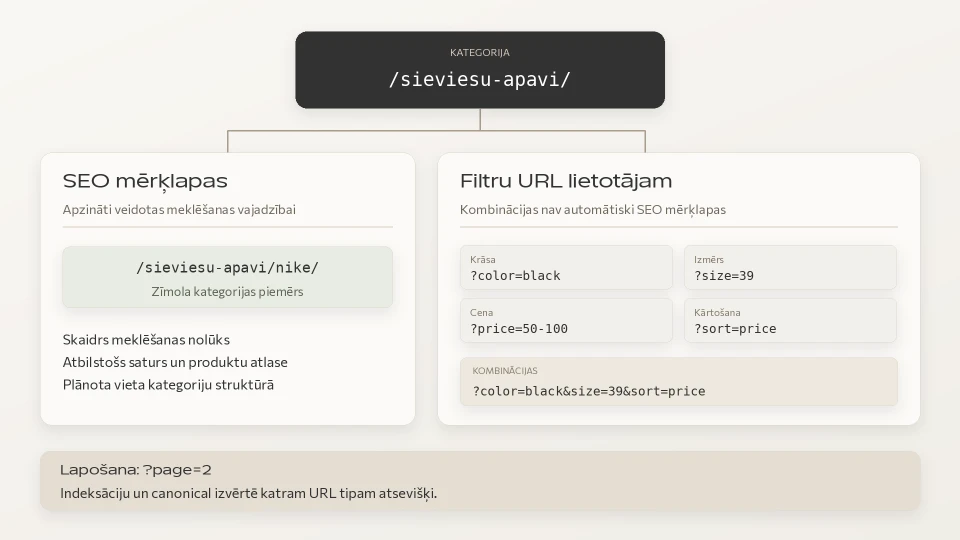
SEO-valuable filters vs technical combinations
For example:
/womens-shoes/nike/
can be a valuable SEO landing page if people search for "Nike women's shoes" and the page has a relevant product range.
Whereas:
?size=39&color=black&price=50-65&sort=newest
is usually not needed as a separate Google result.
It is important to control:
- crawling;
- indexing;
- canonicals;
- internal links;
- URL parameters.
Canonicals alone don't solve faceted navigation
If filter URLs are not needed in Google results, you should not rely on canonicals alone.
A canonical can help consolidate signals, but it does not mean Google will immediately stop crawling these URLs.
You also need to decide:
does the crawler need to crawl these URLs at all?
Depending on the architecture, you may need to:
- restrict crawling of specific parameters;
- control how filter URLs are linked;
- use robots.txt for specific unnecessary URL patterns;
- otherwise limit a practically infinite URL space.
SEO-valuable filter landing pages, on the other hand, should be built so that they are stable, crawlable and clearly connected to the site structure.
Pagination, Load more and infinite scroll
Google's crawler usually discovers pages from real href links.
It does not rely on clicking:
"Load more"
or simulating a user's scrolling.
That is why, if you use infinite scroll or Load more, you still need a crawlable URL and link structure underneath the interface.
With pagination, each page needs its own URL.
Important:
page 2, page 3 and other paginated pages should not have a canonical pointing to page 1 just because they belong to the same category.
Each paginated page usually needs its own canonical.
Using canonicals
A canonical helps indicate the preferred URL when one piece of content, or very similar content, has several URLs.
In e-commerce, this can matter for:
- tracking parameters;
- sorting URLs;
- product variants;
- duplicate paths.
Indexable pages should usually have a self-referencing canonical.
A canonical is not a universal way to fix a poor site architecture.
If two pages have substantially different content or intent, you should not artificially point one's canonical to the other.
What to do with sold-out products?
If a product is temporarily out of stock, there is usually no reason to delete its URL.
You can:
- keep the page;
- show "not available";
- offer alternatives;
- let users sign up for a notification.
If the product will never come back:
There is a direct replacement
→ a 301 redirect may be justified.
There is no replacement
→ a 404 or 410 may be more appropriate.
You should not redirect all deleted products to the home page.
5. Product structured data
Product structured data helps Google understand more precisely that a page is about a specific product.
For products that can be bought, Product / merchant listing markup is important.
Depending on the product, you can specify:
- name;
- image;
- brand;
- SKU;
- GTIN;
- price;
- currency;
- availability;
- variants;
- reviews;
- shipping information;
- return policy.
This can make the product eligible for richer display in Google Search and Shopping experiences.
Important:
structured data guarantees neither a rich result nor a higher ranking.
Product markup and the initial HTML
Google's current documentation recommends that e-commerce sites place Product structured data in the initial HTML where possible.
JavaScript-generated Product markup is still supported.
However, product data can change quickly:
- price;
- sale price;
- availability.
If this information only appears after JavaScript runs, Shopping crawls may be less frequent or less reliable.
That is why a good technical foundation is:
product + price + availability + Product markup
made available as reliably as possible.
ProductGroup and variants
Google supports ProductGroup to link the variants of one product.
For example:
A Nike shirt
can be:
- black / S;
- black / M;
- white / S;
- white / M.
ProductGroup can indicate that these products belong to one group and differ by:
- colour;
- size;
- material;
- another supported attribute.
Each variant still needs clear identification and technical addressability.
6. Google Merchant Center
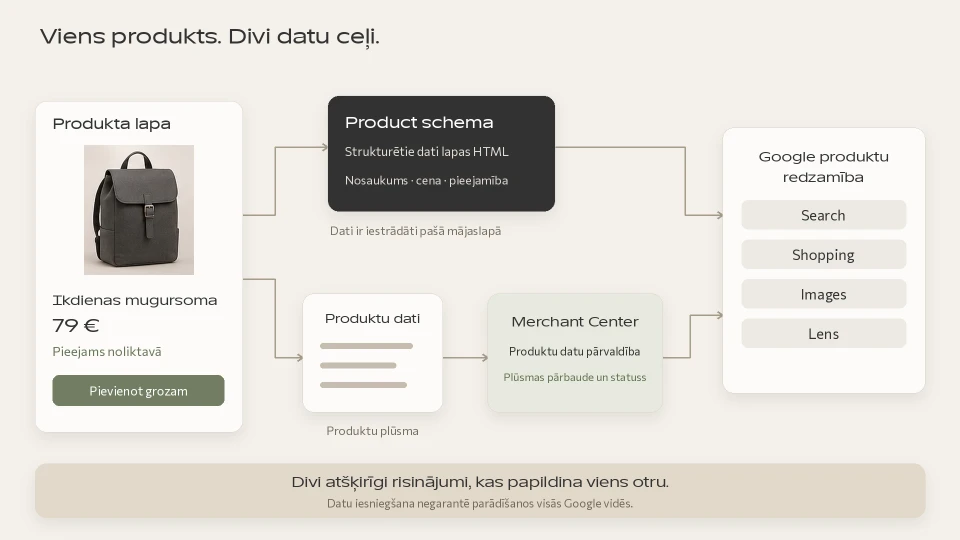
Structured data and Merchant Center are not the same thing.
They complement each other.
Structured data
Product information sits in the HTML of a specific page.
Merchant Center
Google receives a structured product data source.
It can include:
- product ID;
- name;
- price;
- availability;
- image;
- brand;
- GTIN;
- category;
- shipping;
- other attributes.
Data consistency is what matters most.
If the price on the website is €89 but the Merchant Center feed shows €79, data quality or product approval issues may arise.
Merchant Center is not just for Google Ads
Eligible products can also appear in free product experiences, such as:
- Google Search;
- Shopping;
- Images;
- Lens;
- YouTube;
- Gemini.
That is why e-commerce SEO is not only a question of:
"Does the product URL rank in the classic results?"
You also need to look at:
does Google receive high-quality, consistent product data?
A strong combination is:
a high-quality product page + Product structured data + Merchant Center
But Merchant Center does not replace a good category structure, indexing and internal links.
7. E-commerce content and link architecture
Google largely understands a site's structure from the links between pages.
That is why it is important to have:
home page → most important categories
category → subcategories
category → products
product → related products / category
blog → relevant categories or products
If an important product sits six clicks deep and only one link leads to it, it is harder to discover and understand as a significant part of the site.
Connect the blog to the purchase journey
A blog should not publish content just to have "SEO articles".
Good e-commerce content answers questions that come up before a purchase.
For example:
How to choose running shoes?
→ running shoes category
Which shoes are suitable for flat feet?
→ relevant products and categories
Nike Pegasus or Vomero?
→ comparison + products
The journey then becomes:
question → understanding → category → product
Use your store's internal search data too
Internal search is a valuable first-party data source.
It shows:
- what people search for;
- what they can't easily find in the navigation;
- what words customers use;
- where a category or product is missing.
For example, if many users type:
"winter work boots"
but there is no such category, that is a signal to check Google demand as well.
A new SEO category may be needed.
The internal search results pages themselves are usually not pages that should be indexed at scale.
8. Technical e-commerce SEO
JavaScript
JavaScript is not an SEO problem in itself.
Google renders JavaScript.
But you need to be careful if the following only become available after JavaScript runs:
- products;
- category links;
- prices;
- availability;
- Product markup.
Pay particular attention to:
- SPAs;
- Load more;
- infinite scroll;
- products loaded via API;
- JavaScript filters.
Core Web Vitals and performance
In e-commerce, the most common performance risks are:
- oversized product images;
- many third-party scripts;
- tracking tools;
- chat widgets;
- app/plugin overload;
- unoptimised JavaScript;
- slow hosting.
Core Web Vitals include:
- LCP - loading of the main content;
- INP - responsiveness to user actions;
- CLS - visual stability.
The goal is not to ruin product image quality just for a Lighthouse score.
You need to find a balance between:
product presentation + performance + usability
Mobile version
On a mobile device, check:
- category filters;
- product variants;
- the image gallery;
- the "Add to cart" button;
- checkout;
- payments;
- text readability;
- Core Web Vitals.
A technically optimised page that is hard to use on a phone is not a good e-commerce result.
Multilingual online store
If a store operates in several markets, each language version needs a clear URL structure.
For example:
example.com/lv/
example.com/lt/
example.com/ee/
It is important to:
- research keywords for each market;
- not rely only on literal translations;
- use hreflang if it fits the architecture;
- maintain correct canonicals;
- make sure Google can reach all language versions.
Does AI Search change e-commerce SEO?
Yes, but not in a way that makes classic SEO unnecessary.
Google's generative search features are still built on Search fundamentals.
In e-commerce, these remain especially important:
- accurate product data;
- good product content;
- high-quality images;
- structured data;
- Merchant Center;
- price and availability;
- technically accessible pages.
No special AI SEO Product schema is needed.
9. How to check and prioritise SEO work?
Google Search Console
Check:
- indexed pages;
- non-indexed pages;
- canonical selection;
- crawl errors;
- product rich-result issues;
- organic queries;
- category and product clicks.
Merchant Center
Check:
- disapproved products;
- price mismatches;
- availability mismatches;
- missing attributes;
- free listings performance.
Crawl tool
Check:
- status codes;
- canonicals;
- titles;
- H1s;
- duplicate pages;
- orphan pages;
- internal links;
- filters.
But the tool itself doesn't tell you what to fix first.
If a store has thousands of URLs or its organic visibility has stalled, a thorough SEO audit helps separate technical noise from the problems that really affect indexing and visibility.
How to prioritise the work?
Don't start by rewriting meta descriptions for 500 products.
The order is more like this:
1. Can Google find and index the important pages?
If not, start with the technical foundation.
2. Do the right pages match the right searches?
If not, sort out categories and keyword mapping.
3. Are the most important categories good enough?
Categories often have the biggest organic growth potential.
4. Are the most commercially important products optimised?
Prioritise products with:
- demand;
- good margins;
- availability;
- business importance.
5. Is the product data correct in Google's environments?
Structured data + Merchant Center.
6. Only then scale content
For example:
- buying guides;
- comparisons;
- FAQs;
- blog posts;
- new SEO categories.
A practical e-commerce SEO checklist
Structure
- the most important categories have their own URLs;
- categories match real search intents;
- products are reachable through internal links;
- no unnecessarily deep structure.
Categories
- unique title;
- clear H1;
- useful category content;
- links to subcategories;
- correct canonical.
Products
- accurate product name;
- high-quality description;
- price;
- availability;
- specification;
- high-quality images;
- ALT text;
- correct canonical.
Technical SEO
- XML sitemap;
- robots.txt;
- filter URL control;
- pagination;
- no mass duplicate URLs;
- 404/301 logic;
- mobile version;
- Core Web Vitals.
Product data
- Product structured data;
- correct price and currency;
- availability;
- SKU/GTIN, if available;
- product variants correctly structured;
- Merchant Center;
- Merchant Center data matches the website.
Measurement
- Search Console;
- Merchant Center performance;
- GA4 e-commerce events;
- organic clicks to categories;
- organic clicks to products;
- organic revenue.
Frequently asked questions
What is e-commerce SEO?
E-commerce SEO is the optimisation of an online store's categories, products, content and technical structure so that products are easier to find in Google's organic results and other Google product experiences.
Where should I start with online store SEO?
Start with the category structure, search intent and an indexing check.
There is no point optimising hundreds of product pages if Google cannot properly find the categories or is crawling thousands of unnecessary filter URLs.
Does every product need a unique description?
The most important products should provide unique information that is valuable to the buyer.
In large catalogues, it is not always realistic to rewrite every description by hand, so prioritise the most commercially important products and categories.
Does a category page need SEO text?
A short, high-quality category description can be useful.
There is no need to add long text just for keywords.
Does Product schema improve Google rankings?
Structured data by itself does not guarantee a higher ranking.
It helps Google understand product information and can make a page eligible for richer Search and Shopping features.
Do I need Merchant Center if I don't use Google Ads?
It can be valuable without ads too.
Eligible products can qualify for free product listings in various Google experiences.
Should filter pages be indexed?
Not all of them.
SEO-valuable filter combinations can be indexable if they have a distinct search intent and a good product range.
Technical or very narrow combinations usually don't need to become separate SEO landing pages.
How quickly does e-commerce SEO deliver results?
There is no single timeframe.
Results depend on competition, site history, technical issues, number of products, content quality and the scale of changes made.
SEO should be treated as a long-term channel, not a one-off optimisation.
Summary
Good e-commerce SEO doesn't start with rewriting 500 meta descriptions, but with the right system.
Search intent
→ category structure
→ product pages
→ filter and URL control
→ internal links
→ Product structured data
→ Merchant Center
→ measurement and improvements
The most important thing is to make sure Google clearly understands:
what you sell, which page matches a particular search and how your products are structured.
If your online store is still being planned, SEO should be considered from the start of online store development.
Category structure, filters, variants, canonicals and product data architecture are much easier to plan before the store goes live than to fix after Google has already discovered thousands of unnecessary URLs.